
COMPUTER
AIDED ARCHITECTURAL DESIGN:
3-D GEOMETRICAL MODELING AND VISUALIZATION
ARCH 2710 FALL 2025
https://web.arch.virginia.edu/arch2710
DRAFT 1.0
SCHOOL OF ARCHITECTURE
UNIVERSITY OF VIRGINIA
CLASS MEETING LOCATIONS
Discussion Sessions/Workshops,Campgell 105
Lectures, Campbell 153
The workshop/discussion sessions will begin on Tuesday, August 26 in computer classroom Campbell 105. A personal laptop is not necessary.
The first meeting of the class as a whole is on Thursday, August 28h, at 5 pm in Campbell 153.
OFFICE HOURS & COMMUNICATIONS
Office Hours Signups will be posted on Canvass for Earl Mark and the Student Instructional Assistants.
Communication WIll Be Handled Through The Canvass Messaging System _ Please Turn Notifications On For ARCH 2710
INFORMATION
TECHNOLOGY STAFF HELPREPORT FORM
Problem Report Form: https://arch-web.arch.virginia.edu/it_request
OVERVIEW
ARCH 2710 is a hands-on course in three-dimensional computer-aided design, geometrical modeling, and visualization. Using a case study approach, we will explore the quantitative basis and invisible geometrical order of shapes found in architecture and nature. Topics progress from a foundational set of principles to more advanced 3D modeling and visualization methods.
|
|
|---|---|
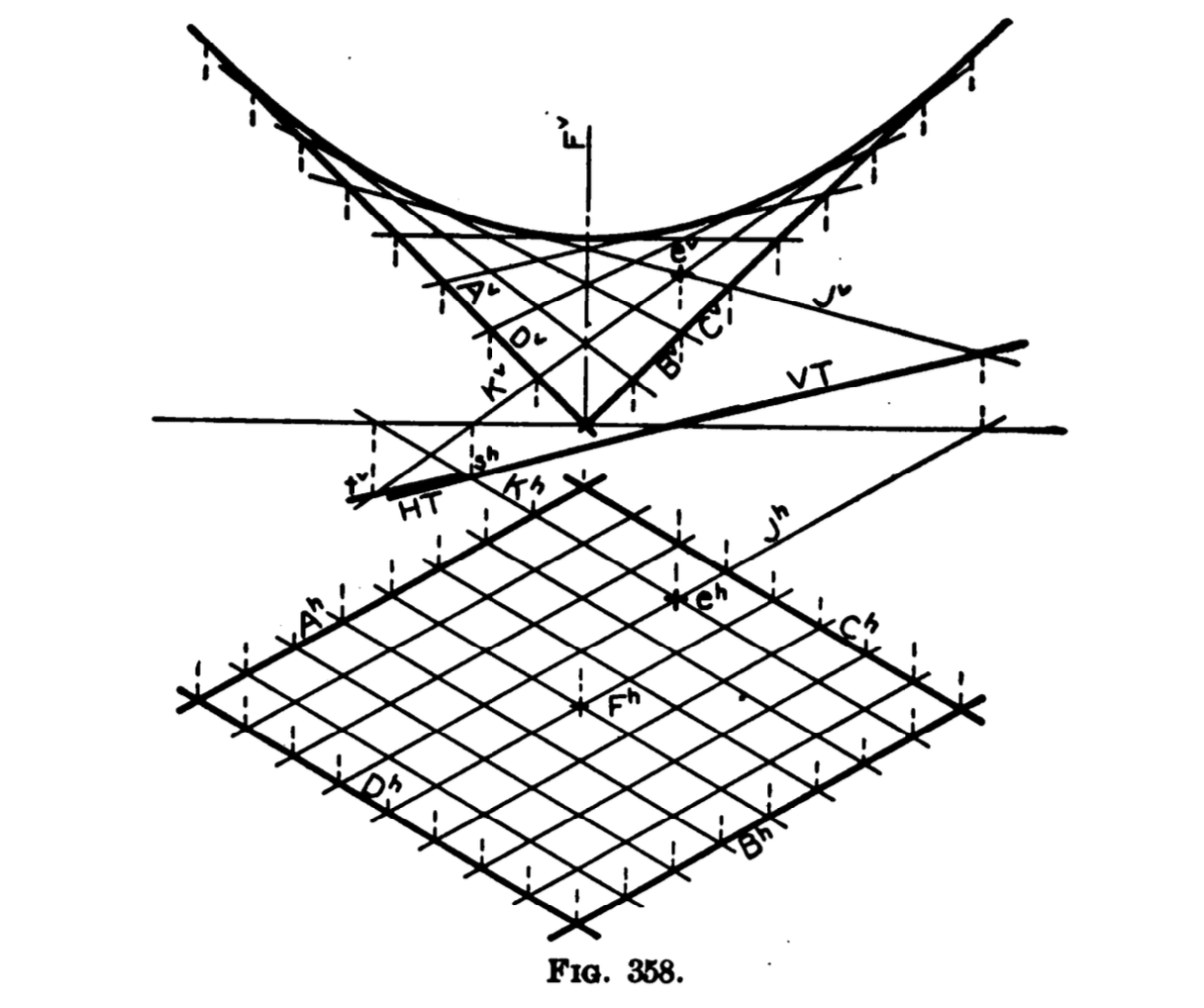
| Left: Hyperbolic paraboloid, from Descriptive Geometry (Kennison & Bradley, 1923, used at UVA School of Architecture in the 1950s). | |
| Right: Saddle surface derived from simpler algebraic expression (Mark, ARCH 2710, 2025). | |
We will build on the projective drawing traditions of Descriptive Geometry that architects a few generations ago were required to learn in order to manually draw 3D forms on traditional paper based media. However, we will do these projections with a more streamlined contemporary approach possible in 3D computer based geometrical modeling methods. We will also root our approach to ideas that revolutionized 3D modeling and visualization in what was arguably the very first computer aided design system, Ivan Sutherland’s Sketchpad (1963)*, and its groundbreaking concepts known as parametric variation, instantiation, and constraints, principles still central to advances in contemporary computer aided design systems today.
Architecture students typically choose case studies for ARCH 2710 from works of architecture and/or landscape architecture. Non-architecture students may pursue similar or alternative 3D modeling topics that may be more relevant to their major field of study (e.g., a biology or CS student could study radiolaria) in consultation with the Instructor and their individually assigned Student Instructioal Assistant (SIA).
Students will lean to break down seemingly complex forms into a series of simpler and more readily understandable steps. For example, for medieval masons, these steps could be done with string and a few fixed points to project the arcs needed to construct a quadripartite vault. Similarly, following a basic set of step-by-step methods, it is possible to project the geometries of doubly-curved contemporary structures of a toroidal roof shell structure, such as created Foster & Partners in the Gateshead International Center for Music, or the landform Wave Fields created by Maya Lin. We will also examine dynamic visualization techniques such as animation, atmospheric simulation, and camera and object movement. By the end of the semester, the objective is for students is to be able to apply these tools creatively and systematically in their own speculative design exploration.
* Learn more about Ivan Sutherland's Sketchpad.
FORMAT
The whole class will meet roughly every 3 weeks on Thursdays at 5 pm and varying toabout 5:45 pm or as late 6:15 pm at in Campbell 153. Primary hands on instruction will occur in a discussion session/hands-on workshop group that meets twice weekly in a computer equipped classroom Campbell 105. See the Student Information System (SIS) for your personal discussion session times. The
workshops combine group and individual
instruction with thin client computers connected to high perforance virtual workstations loaded with all the software we will use in the course.
The lectures provide a theoretical and conceptual framework, describe current and speculate on emerging technologies that drive the evolution of the technology. In parallel the workshop venue is more intensively focused on specific hands-on techniques of computer based 3D geometrical modeling, digital terrain modeling and visualization. They include photo-realistic and abstract methods of rendering, image-processing, color-manipulation, photo--realisitc true representation (true global illumination light energy simulation), athmospheric and materials simulation, animation, and export of data for combined media applications. In addition, if time allows, we will look briefly at a macro programming language (e.g., Python) that is a part of, Rhino, the computer aided design system that we use in the course.
Computer resources are available in Campbell Hall on a 24 hour basis subject to limits that may be reimposed such as occured during the recent pandemic. Students from academic programs outside of the School of Architecture will be given building access through a university ID card swipe system that is located at a few key entrances to the building. In addition Virtual Computer workstations are also available to students enrolled in the course from their personal computers over the Inernet on a 24 hour basis through regular UVA computer accounts. In addition, computer workstations, are available 24/7 through the School of Architecture.
SOFTWARE
All the software we use can be accessed online at no cost from your personal computer by logging into a Virtual Computer system, which requires installing free VMWare software. The main software includes Rhino 8.0 with plugins for Grasshopper, Python for Grasshopper, V-Ray, and additional third-party programs for human form generation, video editing, and specialized visualization. Rhino 8.0 is installed on all physical Windows computers in the school's labs and classrooms, as well as on the school's Virtual Computer system. However, for more fully compatible unlimited access, you should plan to install Rhino 8.0 on your personal computer. More details will be provided on the first day of class.
Rhino 8.0 for Windows can be purchased online from Cavalier Computers at the UVA Bookstore for roughly $95.00. Rhino is the only required purchase for the class. It is generally needed for coursework in the School of Architecture. In addition, Chaos Group offers V-Ray for Rhino 8.0 at a discounted educational price that you may want to consider, but is not required. ((https://www.chaosgroup.com/education/students).
More free software can be downloaded by following instructions on the School of Architecture's website (https://www.arch.virginia.edu/resources/software-resources). For ARCH 2710, please wait until we cover this technology in the workshops before downloading any of this added software.
Here's short summary of the key software we will engage for the semester.
Required academic license -
Rhino 8.0
- (purchase at
special price at Cavalier Computers and also see http://www.rhino3d.com/)
Recommended academic license (stay tuned for an update on special academic pricing and do not purchase this beforehand) -
V-Ray 7 Plugin For Rhino
(https://www.chaosgroup.com)
Free Open Source Academic Licenses:
MakeHuman (software for modeling human characters)
GIMP (a no cost alternative to Adobe Photoshop)
OpenShot (a no cost alternative to Adobe Premiere)
REQUIREMENTS
The exercises in the class are cumulative in technique and lead to a
final project. The first five exercises count for 10%
of the grade each. The final project counts for 40% of the grade. Class
participation through regular attendance in lecture and the workshops, email and additional consultation with your SIA as required on exercises counts
towards 10% of the grade. We follow a case study method that is based on an individual choice of a precedent based study.
SCHOOL OF ARCHITECTURE ADDENDUM ON ACADEMIIC STANDARDS
Please see this statement developed through the Office of the Associate Dean of Academics within the School of Architecture. These standards are required of syllabi within the School and are applicable to ARCH 2710.
CLASS PARTICIPATION, ATTENDANCE
This is an in-person course. Your presence and active participation is important to creating the most effective, incrementally sequenced and coherent learning experience. Full attendance to all workshops and lectures is required. Excusable absences are allowed only as permitted as determined by UVA policies. They should be communicated to the course instructor and (unless private) to your SIA. Apart from excusable absences, missing a significant number of classes can result in a failing grade. Please communicate any expected absenses in advance or otherwise as soon as possible. Also, let Earl Mark and your Student Instructor Assistant know of any potential difficulties you are having so that we can provide tutorial support and accommodations as soon as possible.
Please note the school-wide caveat that "consistent in-person attendance in classes is a vital part of the educational process and is expected throughout the semester. At the University of Virginia, students are expected to accept the responsibility of attending classes in-person on a prompt and dependable basis." According to the School's curent recommended guidelnes, two or more unexcused absences can have a direct impact on your overall evaluation for the course and likely result in a grade reduction. On the one hand, a pattern of unexcused absences could seriously hinder achievement in the class given the step by step sequential nature of the learning process. On the other hand, the course materials do not assume prior knowlege, but are paced to provide ample opportunity to occasionally make mistakes and catchup, which is part of the calculated timetable for gaining proficiency and deepening your understanding of the subject.
The class is committed to maintaining a healthy and receptive environment for all of us by respecting and making room for differences in how we approach learning. Although we are a large class, we hope to encourage more individual case study semester project choices that give more license for you to be motivated by what interests you, and evolve a workshop methodology that along with office hours will allow you optimize individual support through direct mentorship by SIAs and the course instructor.
Switching discussion session time-slots for a few special occasions with permission of
the
instructor is possible under extenuating circumstances. The class uses a system of continous assesment throughout the semester that aims to not penalize lack of experience or weaknesses due to lack of initial understanding but is focused more on cumulative results and growth. Don't hesitate to readily indicate that you don't know something as this is more likely to contribute to your overall growth and complete learning experience.
HEALTH
Your health and well-being are also a priority. Please take the time to care for yourself. For guidance on available resources, please see the Student Health and Wellness website . Note that “Student Health and Wellness does not provide ‘medical excuse notes’ to students for absences from classes, labs, studios or exams, or for missed deadlines due to short-term illness, injury, or other clinical appointments.”
For more information on the University’s policy regarding Academic Accommodations for Religious Observance, follow this link for the Provost Policy PROV-008. For guidance on what constitutes a reasonable accommodation, please visit the following link: Frequently Asked Questions - Accommodations for Religious Observance or contact the University’s Office for Equal Opportunity and Civil Rights (EOCR) at uvaeocr@virginia.edu or (434) 924-3200.
AI Use
Foundation AI techniques for generating geometrical forms at a basic level will be explored. This includes using computer vision to understand and reproduce complex geometries. As discussed in class, AI can be used assist in outlining the step-by-step process and forming the basic algebra of geometric descriptions. It can be used in specifying atmospheric conditions from a photo or painting. However, the assembly and completion of these forms for exercises will require direct 3D thinking and modeling skills. Documentation of any AI techniques used in the process should be a part of the exercise submission.
INDIVIDUAL SUPPORT
Students bring a wide range of experiences, abilities, and circumstances to the classroom. Our goal is to create an environment that supports individual learning needs while encouraging open exchange of ideas.
In this class, your choice of a case study is flexible, provided it meets basic requirements for source documentation and the type of geometry we study. It is not limited by cultural, national, or geographic context, and you are encouraged to select topics that matter to you.
If personal circumstances affect your participation, please let the SIAs or instructor know so we can explore ways to support you. Your engagement and feedback are important in shaping how we teach and learn together.
TECHNOLOGY SUPPORT
If you need assistance using any of the tools for our class, the SIAs and I happy to work with you and enoucrage you to attend office hours for any of the SIAs, not just the one who is assigned to mentoring you, and the course instructor. You can also find resources for each below:
Schedule
| PART 1: | GRAPHIC PRIMITIVES & VECTORS | |
|
AUGUST 25 (week of) |
Course
Orientation & Graphics Primitives |
Exercise 1: technology setup, case study selection - Optional Video Linked In Learning (through UVA, formerly ask lynda): Rhino 7 Essential Training. part 1. the Interface. |
| SEPTEMBER 1 | Symmetry
Transformations & Filters Diagramming Gravity grid Model space coordinate systems Transformation utilities Locational filters Data filters Black box abstraction Shape grammar rule systems |
Exercise 2: Symmetry Transformations in Plan and Elevation - Optional Video Linked In Learning: Rhino 7 Essential Training. Part 2. Drawing 2d geometry. |
|
SEPTEMBER 8 |
Axonometric
& Perspective Projection Conventions of visualizing 3D Construction planes Critchlow & Fuller Octahedrons Perspective projection Durer/Descartes View transformation matrices |
|
| PART 2: | 2D to 3D GEOMETRICAL PROJECTION | |
|
SEPTEMBER 15 |
Introduction to Solid
Modeling |
Exercise 3: transformations, introduction to surfacing and Solid modeling - Optional VideoLinked In Learning: Rhino 7: Essential Training. Part 4. Modeling Basic surfaces |
| SEPTEMBER 22 | Digital
Terrain Modeling |
|
|
SEPTEMBER 29 |
Surfaces Editing & NURBS Working with Bezier, Bspline and Composite Curves NURBS Deformable Surfaces |
-Optional Video Linked In Learning: Rhino 5 Essential Training. Part 10. editing and transforming |
| PART 3: | RENDERING , TEXTURE MAPPING AND LIGHTING | |
|
OCTOBER 6 |
Rendering
and Light |
Exercise 4: Rendering and Light - Optional VideoLinked In Learning: Rhino 5 Essential Training. Part 14. rendering skills - Optional Video Linked In Learning: Rendering Fundamentals with Rhino and V-Ray (older version) |
| OCTOBER 13 |
Wrapping
Objects |
|
|
|||||||||||||||||||||||
| PART 7: | TRANSLATION | |
| NOVEMBER 10 | Unfolding
and Fabrication Control Curves Tools Developable Surfaces |
Optional Video Linked In Learning: Rhino 5 Essential Training. Part 15. prototyping |
| NOVEMBER 17 | Advanced Surfaces Through Vector Algebra |
|
|
NOVEMBER 19 |
Final Project Prep Workshop | Exercise 6: Final Exercise |
| NOVEMBER 24 | Final Project Prep Workshop I (Nov. 25) THANKSGIVING RECESS (Nov. 26 - 30) | |
| DECEMBER 1 | Final Project Prep Workshop II | |
| CONCLUSION | ADVISING AND FINAL PROJECT PREPARATION | |
|
December 19 |
Final Project (Exercise 6) Submission Due At Noon |
|
BIBLIOGRAPHY
The following citations are for optional reading, unless otherwise noted in class. Some of these materials will be placed on reserve in the fine arts library.
Training Guides and Documentation
Rhino 6 Training Guide (free from McNeel)
https://www.rhino3d.com/download/Rhino/6.0/training-level-1
Rhino Help Index (free from McNeel) https://docs.mcneel.com/rhino/8/help/en-us/index.htm
Rhino 8.0 New Features (free from McNeel) https://docs.mcneel.com/rhino/8/help/en-us/commandlist/newinrhino8.htm
Chaos Group, V-Ray for Rhino Overview and Docs, 2024
Schultze, David, Rhino
7 Linked In Introducing Rhino 7 (video training availble on grounds or through VPN at UVA)
Schultze, David, Rhino 7 Linked In Essential Traning Rhino 7 (video training availble on grounds or through VPN at UVA)
Schultze, David, Rhino 5 Linked In Essential Training Rhino 5 (video training availble on grounds or through VPN at UVA, includes topics not incorporated into Essential Training Rhino 7)
Schultze, David, Rndering Fundamentals with Rhino and V-Ray. Linked In Rendering Fundamentals with Rhino and V-Ray (older V-Ray version) (video training available on grounds or through VPN at UVA)
Books
Clark, R. H., & Pause, M. (2012). Precedents in Architecture (4th ed.). Hoboken, NJ: Wiley. UVA Virgo System link
Kenison, Ervin, and Harry Cyrus Bradley. Descriptive Geometry. Enl. ed. The Macmillan company, 1923. Hathi Trust Link (UVA Architecture Textbook through 1950s)
Kenison, Ervin, and Harry Cyrus Bradley. Descriptive Geometry. The Macmillan company, 1917. Hathi Trust Link
Thompson, D’Arcy W. (1917). On Growth and Form. Cambridge: Cambridge University Press. Biodiversity Heritage Library link
Rowe, C. (1976). The Mathematics of the Ideal Villa and Other Essays. Cambridge, MA: MIT Press. UVA Virgo System link
Negroponte,
Nicholas, Being Digital.
Published by Hodder & Stoughton, 1995.
Negroponte,
Nicholas (editor), Computer
Aides to Design and Architecture.
Published
by Petrocelli/Charter, 1975. (Read chapters by Gero, Steward,
Sutherland).
Dreyfus,
Hubert and Stuart. Why
Computers May Never Think like People,
Technology Review.
M.I.T., January 1985, pp. 42 -
80.
Eastman,
Chuck, Fundamental Problems in
the Development of Computer
Based Architectural Models, Proceedings
of the
Computers & Design Research Symposium,
M.I.T., August
4, 1986.
Greenberg,
Donald, A True Design Tool,
Architectural
Record. September 1984, pp. 150
- 159.
Kvan, Thomas, Mark,
Earl,Oxman,Rivka, and Martins, Bob, Ditching
the Dinosaur: Redefining the Role of Digital Media in Education,
International Journal of Design Computing, June 2003 .
Mark, E
, Woodbury R. (Senior Editors), Built
Environment, Architectural Theory and Computer Aided Architectural
Design, International Journal of
Architectural Compuing, Issue
Volume 9, Number 2 / June 2011 (accessible via UVA Library subscription
on-line or can be purchased).
Mark, E
, Woodbury R. (Senior Editors), Built
Environment, Architectural Theory and Computer Aided Architectural
Design, International Journal of
Architectural Compuing, Issue
Volume 8, Number 3 / September 2010 (accessible via UVA Library
subscription on-line or can be purchased).
Mark,
E., Martens, B. and Oxman, R,,
Preliminary
Stages of CAAD Education,
Automation in Construction.Volume 12, Issue 6, November 2003,
Pages 661-670
Mark,
E., Martens, B. and Oxman, R, 2001, The Computer
Curriculum,
Architectural Information
Management:
eCAADe Helsinki, pp. 168-175.
Mark,
Earl (2007), Simulating
Dynamic Forces in Design with Special Effects Tools,
Predicting the Future [25th eCAADe Conference Proceedings / ISBN
978-0-9541183-6-5] Frankfurt am Main (Germany) 26-29 September 2007,
pp. 219-226
Mark,
Earl,: 2000, A
Prospectus on Computers Throughout the Curriculum,
Promise
and Reality: eCAADe Bauhaus-Universität Weimar, pp. 77-83.
Mark,
Earl, Reconstructing
Architectural Geometry,
Architectural Research Quarterly, Cambridge University Press, England,
March 1999
Mark,
Earl, The Physical and
Conceptual Assembly of Architectural
Form,in Cinema
& Architecture,
1997, BFI Press, England.
Mark,
Earl, A Design Automation
Paradox, Conceptual
Modeling of Buildings, CIB
Proceedings, CIB W74 + W78
Seminar, Publication 126, C M Gruppen, Stockholm Sweden, 1990, ISBN 91
-7332-557-0.
Mark,
Earl, Case Studies in
Moviemaking and Computer Aided Design,
in The Electronic Design
Studio. (Edited by
McCullough, Mitchell and Purcell), M.I.T. bss 1990.
Mark,
Earl, Architecture In Motion
in Computers
in Architecture. (Edited by
FranÙois Penz),
Longman 1992.
Mitchell,
William and Stiny George. The
Palladian Grammar, Environment
and Planning B. May 1978, 5 -
18.
Schmertz,
Mildred F., A New Museum by
Walter Netsch, Architectural
Record. January 1980.